4.12 Active Session Management
Why manage an active session?
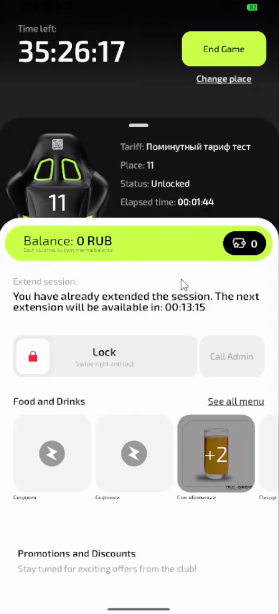
Effective session management allows you to:
- Control time — monitor the remaining time and extend the session if needed
- Maintain comfort — lock the PC during breaks without losing paid time
- Solve problems — quickly call for help in case of technical issues
- Change seat — move to another PC when necessary
- Save money — end the session early if your plans change
In short: managing the session means full control over your time and comfort in the club.
Overview of management options
Session extension
- Purpose: To continue playing when time is running out
- When to use: When you receive a notification that the session is about to end
- Advantage: Continuous gameplay without interruptions
Why this matters: You avoid automatic session termination at the most critical moment of the game.
Locking the PC during a session
- Purpose: To temporarily lock the computer without losing paid time
- When to use: During breaks, phone calls, bar visits
- Advantage: Preserves confidentiality and the current session
Why this matters: No one can use your computer while you are away.
Changing seat
- Purpose: To move to another computer without losing time
- When to use: In case of technical issues or if you want to change zone
- Advantage: Flexibility in choosing a workplace
Why this matters: You can resolve equipment issues without losing paid time.
Calling the administrator
- Purpose: To get help with technical or other issues
- When to use: For PC malfunctions, tariff questions, problems with orders
- Advantage: Fast problem resolution without leaving your seat
Why this matters: You save time otherwise spent looking for the administrator around the club.
Ending the session
- Purpose: To end the session early or when time runs out
- When to use: When you need to leave earlier or after finishing the game
- Advantage: Control over time and finances
Why this matters: You keep the remaining time or stop further charges.
How to choose the right function
- Time is running out? → Use session extension
- Need to step away? → Activate PC lock
- Problems with the computer? → Call the administrator or change seat
- Finishing the game? → End the session
Common situations
| Problem | What to do and why |
|---|---|
| I don’t know which function to use | What to do: Decide what exactly you need — extend time, solve a problem or take a break. Why: Each function solves a specific task during the session. |
| A function doesn’t work | What to do: Try refreshing the app screen. If that doesn’t help, call the administrator. Why: Technical issues may temporarily limit access to some functions. |
| I need urgent help | What to do: Use the administrator call — this is the fastest way to get assistance. Why: The administrator receives a notification and comes to you. |