3.15.3.1 Monitoring subscription management
The monitoring subscription management functionality is under active development and will be expanded in future IZI system updates. Later we will add a full personal account on https://izi.is where club owners will be able to manage subscriptions to monitoring and other IZI services on their own.
What will be available in the future personal account
It is planned that the club owner will be able to:
- manage the monitoring subscription (enable / disable)
- change tariff plans
- view payment history
- manage subscriptions to additional IZI services
- receive notifications about subscription renewal or expiration
Where this function is located in CRM
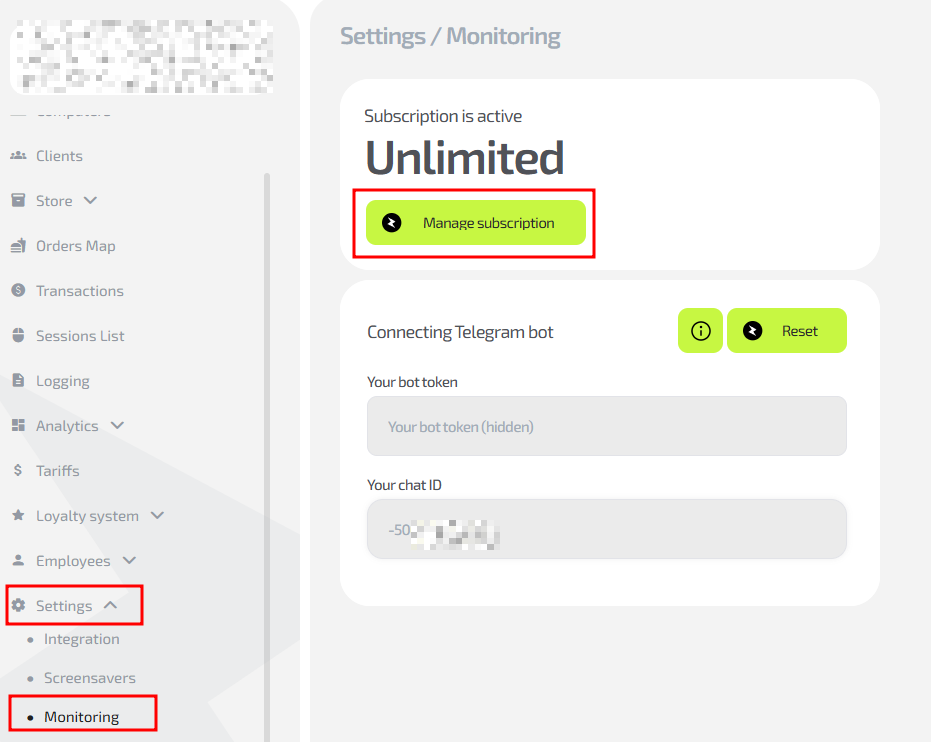
- Open IZI CRM and log in under an owner or administrator account (with the required rights).
- In the left menu select Settings.
- In the dropdown menu click Monitoring.
- At the top of the screen you will see the “Manage subscription” button.
At the current stage, the button is inactive and serves as a placeholder for the upcoming functionality. In the next updates it will lead to the personal account on izi.is, where all management tools will become available.
As of now
Enabling monitoring and managing the service is done via IZI support.
If you need to:
- enable monitoring for new PCs
- disable the service
- change subscription conditions
- check connection status
contact IZI support — the procedure is described in detail in article 1.8 IZI.IS technical support information.